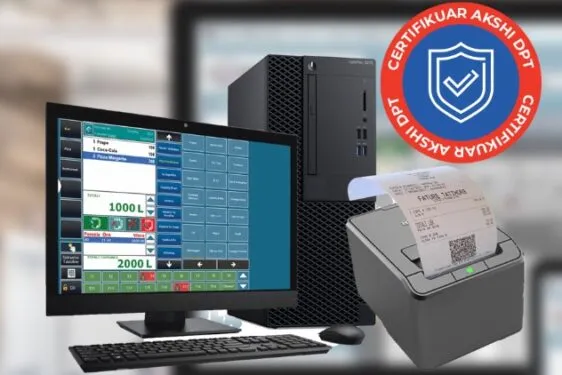
RestoBar+ helps you keep service under control from table to fiscal invoice. Waiter phones, points of sale, bar, kitchen, restaurant, and pool printers, ingredient inventory, shifts, payments, reports, and fiscalization work in an installed workflow built for bars, restaurants, hotels, resorts, and SPA operators.
Best fit
Bars, cafes, restaurants, pizzerias, fast-food venues, beach bars, hotels, resorts, clubs, SPAs, and service operators.
Outcome
You coordinate tables, orders, waiters, printers, inventory, shifts, prices, payments, invoices, day-end closing, and reports during demanding service hours.
Keep tables, waiters, and points of sale coordinated
RestoBar+ is built for venues where service moves quickly. You see tables, open orders, waiters, customers, points of sale, printers, and payments in one workflow, without splitting daily work across paper notes or separate tools.
Suitable for bars, cafes, restaurants, pizzerias, fast-food venues, beach bars, hotels, resorts, and SPAs.
Supports multiple points of sale under one tax ID, with printers or routing by room, counter, or service sector.
Helps the owner and manager understand who served, what was ordered, what printed, and what was paid.
Supports happy hour and different prices by schedule or point of sale, such as bar, restaurant, or pool.
Handheld/Phone
The waiter sends orders directly to the bar or kitchen
When staff take orders at the table, the phone routes the order to the right printer or kitchen screen. One order can include bar and restaurant items, while each item prints where it should be prepared.
Ordering from a phone, handheld, or PDA according to your setup.
Routing to bar, kitchen, restaurant, pool, 80mm, 58mm, or A4 printers.
Less waiting and fewer mistakes between the table, sectors, and cashier.
HORECA Inventory
Connect dishes with ingredients and warehouses
RestoBar+ helps you manage items, warehouses, suppliers, customers, entries, exits, and supplier inventory. With recipes, food and drink sales can be connected more accurately with real ingredient use, cost, and warehouse stock.
Item, warehouse, supplier, customer, and supplier-inventory management.
Recipes, ingredients, and costs for stronger stock control.
Reports that help the owner understand what sold and what was consumed.
Offline Continuity
Service continues even when the internet connection drops
In a HORECA venue, internet interruptions should not stop the tables. RestoBar+ supports immediate offline printing and, when the connection returns, resumes re-approval or synchronization of non-fiscalized invoices according to configuration and the legal workflow, while reports help close cash, shifts, and daily turnover.
Fast offline printing for temporary internet interruptions.
Automatic re-approval or synchronization when the connection returns.
Clearer control over shifts, cash registers, expenses, users, and day-end reports.
See the right setup for your venue
Share your business type, table count, printers, points of sale, waiter phones, and day-end workflow. IVA helps you choose the right configuration.
One HORECA program for service, inventory, and fiscalization
RestoBar+ brings orders, printers, warehouses, cash registers, shifts, prices, payments, reports, and support into a practical workflow for your business.
Tables And Areas
Organize the floor, open orders, and table movement during service.
Waiter Shifts
Open, track, and close shifts by staff member, role, and point of work.
Phone Orders
Send waiter orders from the phone to the right service sector.
Mobile Manager
Supervise sales, tables, and key actions even when you are away from the register.
KDS Or Kitchen
Control preparation and order status in the kitchen.
Local Support
Get assistance for configuration, training, and real HORECA workflows.
Items And Prices
Maintain products, categories, and prices by schedule, happy hour, or point of sale.
Recipes And Ingredients
Connect dishes and drinks with the ingredients that affect stock.
Warehouses
Track entries, exits, and warehouse stock by venue area.
Suppliers
Record purchases and keep supplier activity clearer.
Supplier Inventory
Control the goods and quantities connected with business supplies.
Expenses
Keep expenses close to the reports that affect daily control.
Cash Or Bank Payments
Finish invoices with the payment method your customer uses and keep them close to turnover.
Event Invoices
Prepare documents and invoices for banquets, events, or business customers.
80mm/58mm/A4 Printers
Route orders to the printer that fits checkout, bar, kitchen, pool, or office work.
Offline And Re-Approval
Print immediately and synchronize invoices when internet returns.
Day-End Closing
Review turnover, cash, payments, shifts, and point performance at the end of the day.
Multiple Points Of Sale
Organize several points under the same tax ID with separated reports and printer routing.
Plans and next step
IVA helps confirm the right configuration before you buy.
RestoBar+ is HORECA fiscal POS software for bars, cafes, restaurants, pizzerias, fast-food venues, beach bars, hotels, resorts, clubs, SPAs, and venues where tables, orders, waiters, printers, inventory, and fiscalization must work together. It fits operators with busy service, floor staff, and daily reporting needs.
Can it support multiple waiters and points of sale?
Yes. RestoBar+ supports setups from a small venue to operations with many waiters, several points of sale, and multiple printers under one tax ID. You can separate work by floor, bar, kitchen, pool, beach bar, or other service areas while keeping reporting centralized.
Can waiters send orders from a phone?
Yes. RestoBar+ can be used with phone ordering for waiters, where the order is taken at the table and sent to the bar printer, kitchen printer, or screen/KDS according to configuration. This reduces manual notes, keeps the order connected with the invoice, and helps the team during rush hours.
Do handheld, PDA, and phone mean the same workflow?
Yes. For the customer, handheld, PDA, and phone describe the same waiter-ordering workflow: the order is taken on a handheld device or phone and sent to the right sector. The name depends on the device you use, but the goal is the same: fewer manual notes.
How does printing to multiple printers work?
One order can include bar, kitchen, restaurant, or pool items, while RestoBar+ routes each item to the correct printer. A drink can print at the bar and food in the kitchen, without losing the connection to the table, waiter, and fiscal invoice.
Does RestoBar+ manage waiter shifts and day-end financials?
Yes. RestoBar+ helps you track waiter shifts, turnover, cash or bank payments, cash register activity, and service reports. At the end of the day, the owner or manager can review what sold, who worked, what was collected, and which points performed.
Can I set happy hour or time-of-day prices?
Yes. RestoBar+ can be configured for happy hour or time-of-day pricing, meaning the same item can change price during specific time windows. For example, coffee can be 50 LEK from 06:00-08:00 and 100 LEK for the rest of the day.
Can I set prices by point of sale?
Yes. RestoBar+ can keep different prices for the same item depending on the point of sale where it is served. For example, coffee can be sold for 100 LEK at the bar and 150 LEK at the pool, while table, printer, and cash reporting stays separate.
Does RestoBar+ manage ingredient inventory?
Yes. RestoBar+ covers items, warehouses, suppliers, customers, and supplier inventory, while recipes can connect dishes and drinks with ingredients. This helps you understand real consumption, cost, and stock movement more clearly, especially when the menu depends on portions or repeated preparation.
Can I print invoices when the internet is not working?
Yes. RestoBar+ supports immediate offline printing for temporary internet interruptions, so tables and checkout can keep moving during service. When the connection returns, the software resumes re-approval or synchronization of non-fiscalized invoices according to the business configuration and the legal fiscalization workflow.
Which printer formats are supported?
RestoBar+ can be configured with printers for checkout, bar, kitchen, or office use, including 80mm, 58mm, and A4 formats according to your devices. During setup, you define which orders, invoices, or work copies go to each printer so every sector receives only the information it needs.
How much do the handheld/PDA and inventory add-ons cost?
The handheld/PDA add-on for waiter ordering costs 5,000 LEK per year for each device, while inventory management costs 3,600 LEK per year. These add-ons are selected around your number of phones, sectors, warehouses, and the level of stock control your business needs.
Is support included with the annual subscription?
Yes. RestoBar+ support is included each year when you renew the subscription. Advanced and Pro include priority phone support, while setup, training, and assistance channels are confirmed before purchase.
View real RestoBar+ screens
The gallery shows interface screens for orders, shifts, items, scheduled pricing, and user identification.