Advanced Distribution System
SAD
SAD helps you control your distribution network from the first order to the invoice, fiscalization, delivery, and real-time field report. Field agents, mobile warehouses, regional wholesalers, prices, discounts, debtor customers, GPS visits, and reports synchronize through Android devices and cloud access so you can see what is happening in every territory.
Best fit
First-tier importers, distribution companies, regional wholesaler networks, field sales teams, central warehouses, regional warehouses, and mobile warehouses.
Outcome
You gain clearer control over orders, invoices, warehouse status, visits, territories, wholesalers, agents, drivers, returns, shortages, and reporting without spreading daily work across disconnected spreadsheets or messages.
Your distribution network
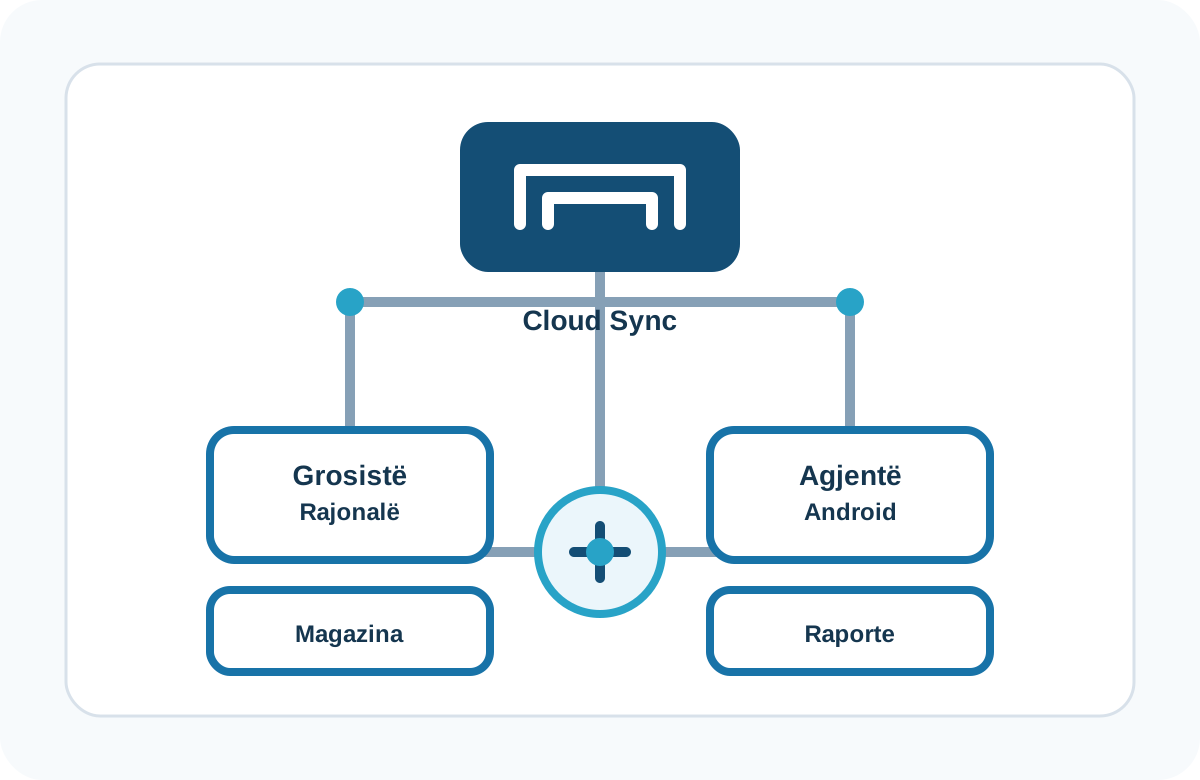
Control your company, territories, wholesalers, and agents from one system
SAD is a distribution system for importers and companies that sell in the field, supply regions, work with wholesalers, or combine their own sales team with partners that cover assigned territories. You see orders, invoices, visits, warehouse status, customers, and reports without waiting for delayed phone calls or spreadsheets.
- Built for first-tier importers and companies that distribute goods across many territories.
- Supports internal sales agents, regional wholesalers, and models where the agent takes the order while the wholesaler fulfills it.
- Helps managers understand what is happening in each region, customer, warehouse, and sales route.
- Structures regions, territories, agents, customers, prices, offers, and warehouses.
Agents on Android
Your agent sells, takes orders, fiscalizes, and reports from the field
When an agent visits a customer, SAD shows history, balance, unpaid invoices, purchased items, prices, discounts, and promotional assets. From the Android device, the agent can register orders, invoices, fiscalization, payments, store checks, shelf photos, no-sale reasons, and GPS-verified visits.
- Orders, invoices, accompanying invoices, returns, payments, fiscalization, and on-site printing according to configuration.
- Tax ID checks, product scanning, customer-specific prices, and controlled discounts.
- Customer history, debtor customers, matured invoices, credit limits, and payment terms.
- Visit records with check-in time, check-out time, location, and no-sale reasons.
Wholesalers and regions
Adapt distribution when regions are covered by wholesalers
If your business hands fulfillment to regional wholesalers, SAD helps keep their activity visible. You can track the territory each wholesaler covers, customers, orders, invoices, wholesaler warehouse status, returns, and the reporting that needs to return to the central company.
- A model for companies that distribute directly and for companies that use wholesalers in regions.
- A model for agents who collect orders while the wholesaler prepares and distributes the goods.
- Reports for territory coverage, visit effectiveness, sales, warehouse status, and regional activity.
Synchronization and reports
See orders, visits, warehouses, and performance in real time from the field
SAD synchronizes data across distribution levels so you can review the day's activity in real time from the field, not only the result after the team returns to the office. Reports help with sales by period, customer, item, agent, region, route coverage, central, regional, mobile, and wholesaler warehouse status, and financial-system data exchange.
- Reports for sales, visits, warehouse status, plan completion, bonuses, and debtor customers.
- Map itineraries and analytical control over daily agent activity.
- Data exchange with financial systems such as Financa 5, Alpha Web, Bilanc, or API integrations depending on the project.
Logistics / work order in development
From one or many orders to picking, manifests, and invoicing
The logistics / work order module is being added to make the path from order to warehouse preparation and delivery clearer. One or many orders become a work order; the warehouse worker picks the required quantities; the dispatcher reconciles shortages, prepares the driver manifest and invoices, then closes the manifest when the driver returns with deliveries, returns, or adjustments. This closes the loop from order to delivery with exact information on why an order was not delivered, when it was delivered, and by which driver.
- Planned process for picking, quantity reconciliation, driver manifest, and delivery invoices.
- Handles adjustments when an order is not delivered fully or is not delivered at all.
- Intended to automate returns or RMA (Return Merchandise Authorization) and backorder handling for missing items during preparation.
See how SAD fits your distribution network
Share how you work today: internal agents, regional wholesalers, mobile warehouses, field orders, fiscalization, financial integrations, or picking workflows. IVA helps you map the right configuration.
What you control every day
A distribution system for field teams, warehouses, and management
SAD brings orders, invoices, fiscalization, agents, wholesalers, warehouses, visits, GPS, prices, debtor customers, reports, and cloud synchronization into one workflow for your company.
Regions and territories
Divide coverage by regions, territories, micro-territories, agents, and wholesalers.
Regional wholesalers
Track partners that cover regions, their warehouses, and the activity they report back to the distributor.
Central warehouse
Keep references, items, customers, prices, configuration, and central reporting together.
Mobile warehouses
Control vehicle stock, replenishment, returns, and availability during the day.
Sales force
Organize agents, supervisors, managers, drivers, and warehouse workers by role.
User permissions
Assign access according to each user's role in your process.
Orders and invoices
The agent registers orders, invoices, returns, or accompanying documents from Android.
Printing and fiscalization
Fiscalize and print customer documents with a mobile printer according to configuration.
Store check
Check customer stock, display, shelf position, competitor products, and photos.
GPS visits
Record location, visit time, itinerary, and no-sale reasons.
Payments and debtors
See balances, collections, unpaid invoices, and overdue days.
Agent notifications
Send system notifications to one agent or the whole team.
Price levels
Use price groups, ranges, customer classifications, and differentiated pricing.
Offers and discounts
Predefine discounts, promotions, free items, and controlled offers.
Promotional assets
Track field assets and their status at customer locations.
New customers
Register new customers, tax ID, coordinates, and territory assignment.
Credit limit
Set payment terms, credit limits, and control over matured invoices.
Customer history
See invoices, orders, purchased items, payments, and customer portfolio.
Sales by period
Analyze sales by customer, item, agent, region, or group.
Route coverage
Measure route coverage, completed visits, and distribution effectiveness.
Warehouse status
See quantity and stock value in central, regional, mobile, or wholesaler warehouses.
Plan completion
Track plans, completion, bonuses, and team performance.
Financial integrations
Exchange items, invoices, supplies, collections, and stock with financial systems.
Mobile reports
Supervisors view sales and activity reports from Android devices.
From order to work order
One or many orders are grouped for warehouse preparation.
Warehouse picking
The worker receives the item list and prepares the quantities that can be fulfilled.
Shortage reconciliation
The dispatcher checks shortages and decides what is invoiced, delayed, or returned.
Driver manifest
Prepare the manifest and invoices the driver takes for delivery.
Manifest closing
When the driver returns, reconcile deliveries, failed deliveries, and the driver that handled them.
Returns and RMA
The process is intended to handle returns or RMA (Return Merchandise Authorization) and orders that remain pending.
Plans and next step
IVA helps confirm the right configuration before you buy.
Pricing depends on the configuration your business needs.
Request DemoFAQ
Common questions
Who is SAD for?
Is SAD only inventory software?
Can SAD support regional wholesalers?
Can agents only take orders while wholesalers fulfill them?
What can an agent do on Android?
How does GPS help distribution control?
Can SAD connect with financial systems?
What is the status of the logistics / work order module?
View the key SAD workflows
The gallery shows the distribution network, Android field sales, regional wholesalers, reporting, and logistics / work-order flows.